 Chess Revision
Saw a puzzle on social media, a position in a video or a game a friend sent you as a picture? Give Chess Revision the screenshot or a photo of the screen. It finds the board, reads every piece and opens the position with Stockfish's evaluation and best move, usually within a few seconds.




The evaluation bar and Stockfish's best lines appear as soon as the position opens. Premium adds the move a human at your rating would play, from the Maia engine. With seven pieces or fewer the endgame tablebase tells you the exact result. Play moves on the board to test your own ideas, and copy the FEN to use the position anywhere else.
Any 2D chess board from a screen. Physical boards on a table are not supported.
From chess sites and apps, puzzle accounts, streams and videos. The board does not have to fill the picture, the app finds it.
A picture of a monitor or TV taken with your phone. The app straightens a tilted board and removes the stripes a camera picks up from a screen.
A board shown from Black's side is recognised and turned the right way round.
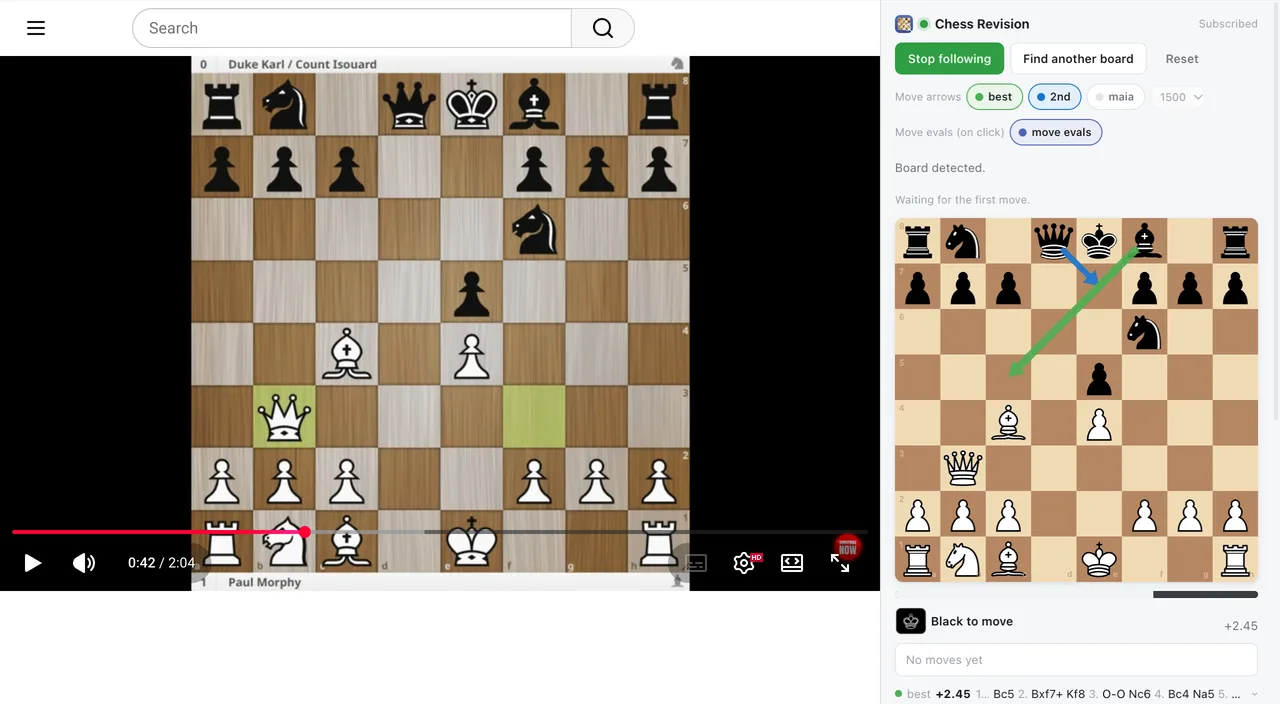
The Chrome extension and the Safari extension for Mac read the board straight off the page you are on, whether that is a video, a stream or an article. They keep following as the moves are played and show the best move next to the board.
Yes. You can import three positions a day for free and analyze them with Stockfish. Premium makes imports unlimited.
Yes. Once the position is open, Copy FEN puts it on the clipboard, ready for any other chess site or app.
A screenshot gives one position. For a full game review, paste the PGN or import the game from Lichess or Chess.com.
Only the cropped board is sent for recognition. See the Privacy Policy.